
Before getting started, ensure you are logged in to your Overwolf account, this feature is available only to registered users.
Steps to request your data:
Right-click the Overwolf tray icon.
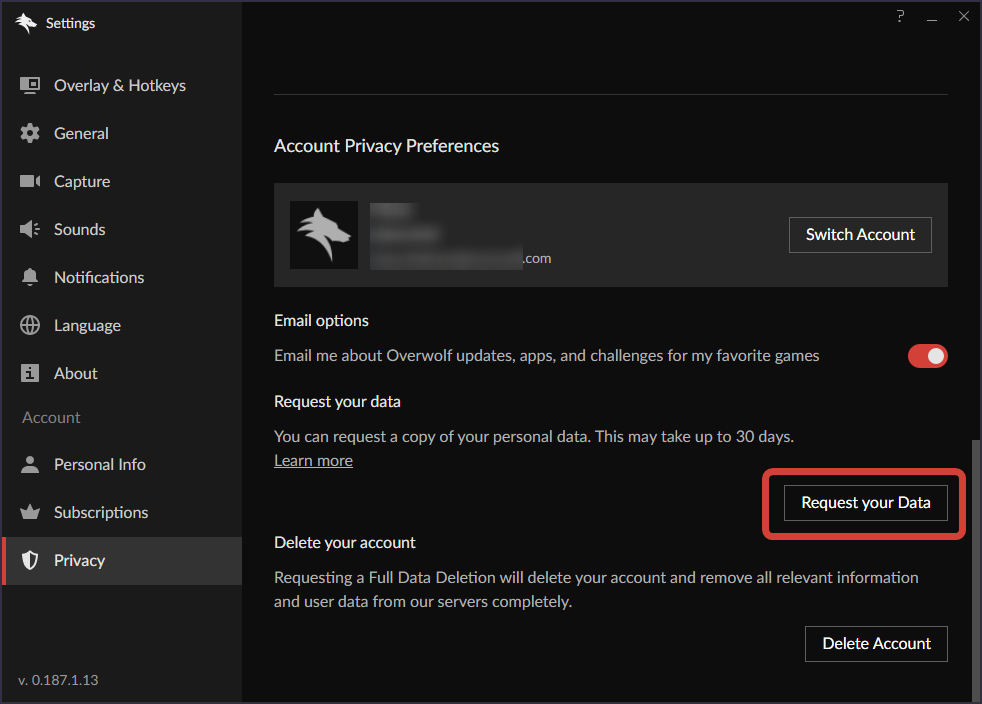
Go to Settings → Privacy → Account Privacy Preferences.
Click Request your data, then confirm the action.
When your data package is ready, you will receive an email at your registered address with a download link.
Please note:
Preparing your data takes time. You can request it once every 30 days, counted from the date of your previous request.
Your Overwolf account must be verified to submit a data request.
If you delete your account while a request is in progress, the data package will be canceled.
You can read the full Overwolf Privacy Policy by clicking Here.
If you need additional help, our support team is always here for you simply open a support ticket.